NSFAS Banking Details: Add, Update and Check Guide in 2026!
NSFAS Banking Details submission is mainly important for funded TVET college students who need to receive allowances directly into their personal bank accounts. To avoid payment delays in 2026, log in to your myNSFAS account, open your profile, add your bank account details, and check if the account is verified.
Your bank account must be in your own name. NSFAS may not approve payments into a parent’s, friend’s, or partner’s account. Learn how to complete NSFAS Banking Details Submission 2026. Add, update, or check your bank account details with simple steps to avoid payment delays easily.
What Is NSFAS Banking Details Submission?
NSFAS banking details submission means adding your personal bank account information on the myNSFAS portal so NSFAS can pay your allowances into the correct account. This is an important step for TVET college students because allowance payments can be delayed if banking details are missing, wrong, or not verified.
In simple words, NSFAS needs to know where to send your money.
Who Needs to Submit Banking Details?
TVET college students funded by NSFAS are usually required to submit their own banking details. You should submit banking details if:
You are a funded TVET college student
Your registration is confirmed
You want allowances paid into your bank account
NSFAS or your college asks you to update your bank details
Your old bank account is closed or incorrect
University students normally receive allowances through their institutions, so the process may be different for them.
When Should You Submit NSFAS Banking Details in 2026?
There may not be one fixed deadline for every student and every college. The safest step is to submit your banking details as soon as your funding and registration are confirmed. Do not wait until the payment date. If your account is not verified in time, your allowance may be delayed.
Tip: Check your myNSFAS account regularly after registration. If the banking section is open, complete it early.
How to Submit Banking Details on myNSFAS
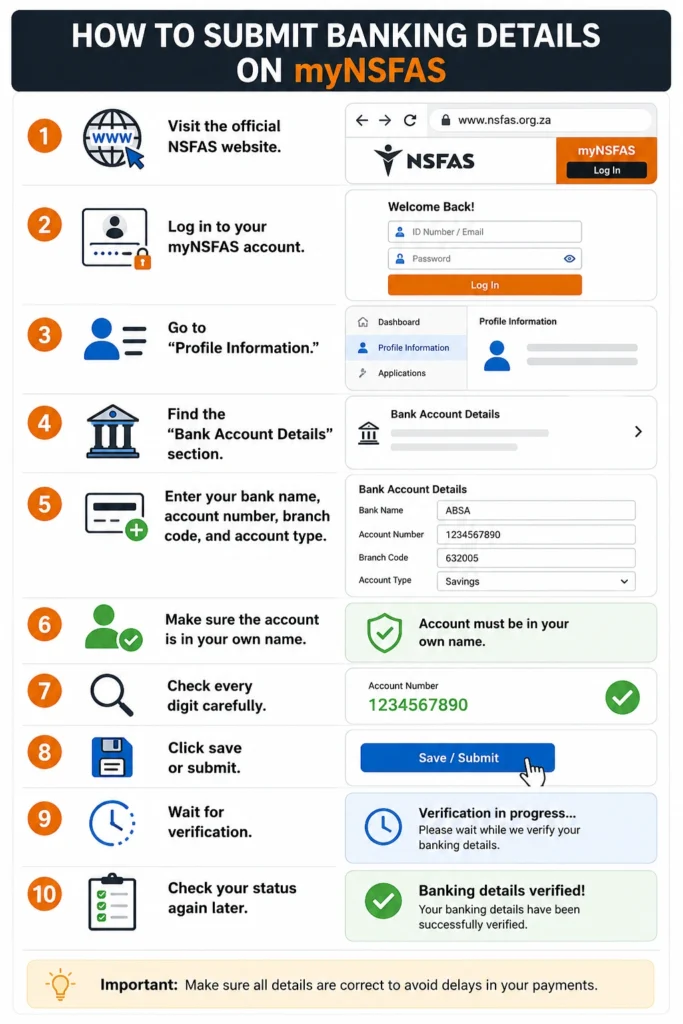
Follow these simple steps:
Visit the official NSFAS website.
Log in to your myNSFAS account.
Go to “Profile Information.”
Find the “Bank Account Details” section.
Enter your bank name, account number, branch code, and account type.
Make sure the account is in your own name.
Check every digit carefully.
Click save or submit.
Wait for verification.
Check your status again later.
Do not rush this step. One wrong number can cause a payment delay.
What Bank Account Can You Use?
You can use a personal bank account from a bank of your choice, but it should meet basic rules. Your account should be:
Avoid using third-party accounts. Even if the account belongs to a family member, it can fail verification because the account holder name does not match your NSFAS details.
How to Check If Your Banking Details Are Verified
After submitting your bank details, log in again and check the banking section.
Use these steps:
If your status is pending, wait and check again. If it fails, correct the details and resubmit.
What Does “Bank Details Pending” Mean?
Pending means NSFAS has not completed the verification yet. It does not always mean something is wrong.
Your status may stay pending because:
- NSFAS is still checking your account
- Your college registration is not fully updated
- The bank is still verifying details
- Your name does not match exactly
- The system is busy during payment periods
If it stays pending for too long, visit your financial aid office or contact NSFAS.
Common Reasons Bank Verification Fails
Bank verification may fail because of small mistakes. Check these common issues:
| Problem | What to Do |
|---|---|
| Wrong account number | Re-enter the correct number |
| Account not in your name | Use your own account |
| Closed bank account | Add an active account |
| Wrong branch code | Confirm with your bank |
| Name mismatch | Make sure your ID and bank details match |
| Registration not updated | Contact your college |
| Old details still saved | Edit and resubmit |
Tip: Before submitting, compare your bank details with your banking app or bank statement.
Can You Edit NSFAS Banking Details?
Yes, you may be able to edit your bank details on the myNSFAS portal if the section is available.
You should update your details if:
After editing, save the details and wait for verification again.
What If Your Allowance Is Delayed?
If your allowance is delayed, do not panic. First check these points:
Is your NSFAS funding approved?
Is your college registration confirmed?
Are your banking details submitted?
Is your bank account verified?
Is your account in your own name?
Did NSFAS release payment for your college?
Did your college send updated registration data?
If everything looks correct but payment is still missing, contact your campus financial aid office first. They can check if your registration data was sent correctly.
Banking Details Safety Tips
Never share your myNSFAS password.
Do not give your banking details to strangers.
Do not trust WhatsApp links claiming to update NSFAS bank accounts.
Use only the official myNSFAS portal.
Do not pay anyone to “release” your allowance.
Make sure your phone number and email are updated.
Log out after using a public computer.
What About Old NSFAS Cards or Wallets?
Some students still hear about NSFAS Wallet or old direct payment cards. But many TVET payments have moved toward personal bank accounts. If you are unsure which payment method applies to you, check your myNSFAS account or ask your financial aid office. Do not assume your allowance will come through the old method.
Quick Checklist Before Payment Dates
Before expecting your allowance, check this:
Doing this early can save you from payment stress later.
FAQs
Conclusion:
NSFAS banking details submission is a small step, but it can affect when you receive your allowance. If you are a funded TVET student, add your personal bank account on myNSFAS as soon as your registration is confirmed.
Use your own active bank account, check every digit, and keep checking the verification status. A correct and verified bank account gives you a better chance of receiving your NSFAS allowance without unnecessary delays.