NSFAS Wallet Guide: Balance Check, Withdrawal and Activation
The NSFAS Wallet is a mobile wallet that lets funded students receive and use allowances through a cellphone. You can activate it with the official USSD code, check your balance, create cash vouchers, withdraw money at approved stores, and pay for goods without using a bank card.
Important note: NSFAS has also moved many TVET allowance payments to students’ own bank accounts. So, use NSFAS Wallet only if NSFAS or your college confirms that your allowance is paid through the wallet. Learn everything about the NSFAS Wallet Guide in 2026, including balance checks, activation, cash withdrawals, common issues, and useful tips for students now.
What Is the NSFAS Wallet?
The NSFAS Wallet Guide is a simple mobile money system used to access student allowances. You do not need a fancy phone. A basic cellphone can work as long as it can dial USSD codes and receive SMS messages.
With the wallet, students can:
It is mostly linked with TVET college allowance payments, but your payment method depends on what NSFAS confirms for your account.
Who Can Use NSFAS Wallet in 2026?
You may use NSFAS Wallet if:
You are funded by NSFAS
Your allowance is assigned to the wallet system
Your cellphone number is registered correctly
Your account has been verified
You have received your wallet password
If NSFAS asks you to submit bank details instead, your allowance may go directly into your personal bank account.
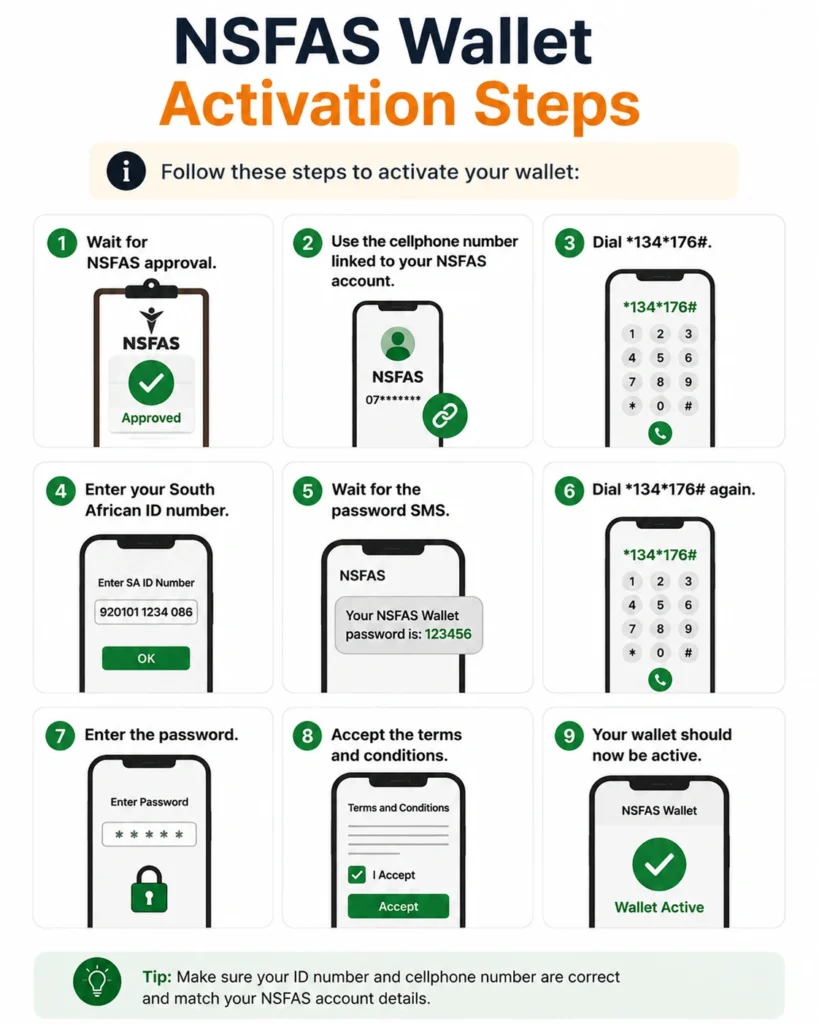
NSFAS Wallet Guide Activation Steps
Follow these steps to activate your wallet:
Wait for NSFAS approval.
Use the cellphone number linked to your NSFAS account.
Dial *134*176#.
Enter your South African ID number.
Wait for the password SMS.
Dial *134*176# again.
Enter the password.
Accept the terms and conditions.
Your wallet should now be active.
Tip: Save the USSD code as “NSFAS Wallet” in your contacts.
How to Check NSFAS Wallet Balance
You can check your balance by phone or online.
Balance Check by USSD
Balance Check Online
Tip: Check your balance before creating a voucher. This avoids failed withdrawals.
How to Withdraw Money from NSFAS Wallet
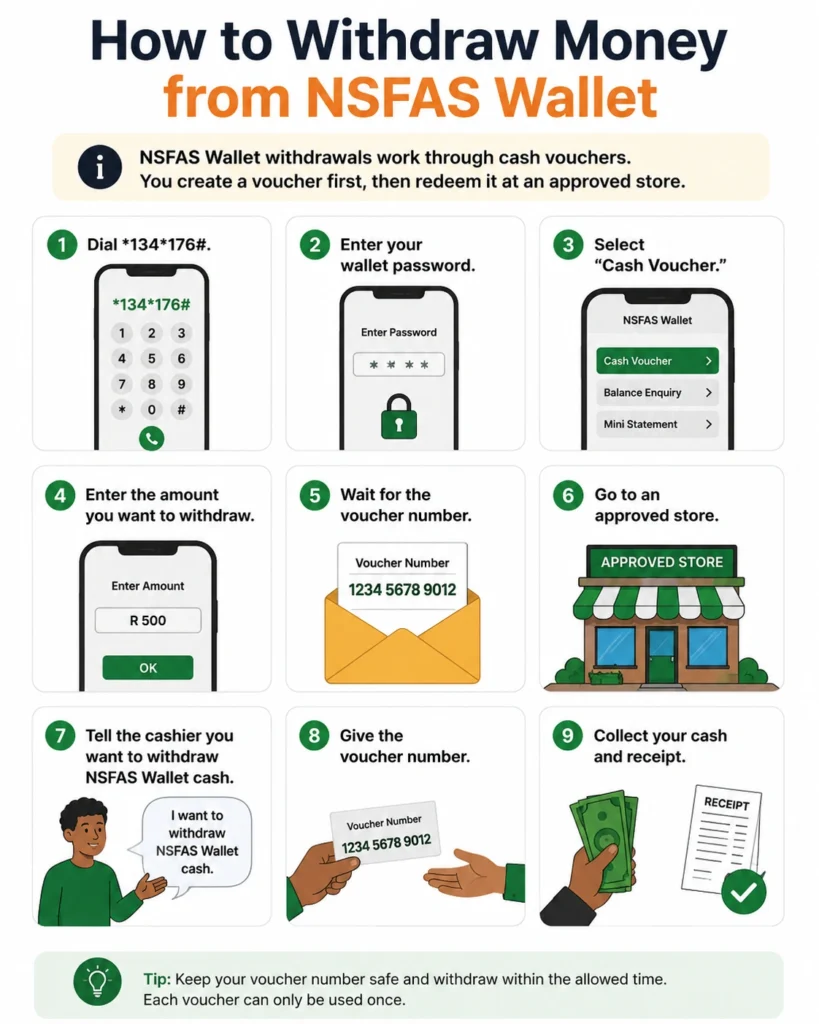
\NSFAS Wallet Guide withdrawals work through cash vouchers. You create a voucher first, then redeem it at an approved store.
Step-by-Step Withdrawal Process
Dial *134*176#.
Enter your wallet password.
Select “Cash Voucher.”
Enter the amount you want to withdraw.
Wait for the voucher number.
Go to an approved store.
Tell the cashier you want to withdraw NSFAS Wallet cash.
Give the voucher number.
Collect your cash and receipt.
Do not create a voucher unless you are ready to use it. An active voucher can reduce your available wallet balance until it is used or reversed.
Approved Stores for NSFAS Wallet Withdrawals
You can usually withdraw money from NSFAS Wallet Guide at these stores:
| Store | Use |
| Shoprite | Cash withdrawal and shopping |
| Checkers | Cash withdrawal and shopping |
| USave | Cash withdrawal and shopping |
| Boxer | Cash withdrawal and shopping |
| SPAR | Cash withdrawal and shopping |
| Choppies | Cash withdrawal and shopping |
Some stores may have system issues sometimes. If one till does not work, ask the cashier to try another till or visit another approved store.
How to Use NSFAS Wallet Guide to Buy Goods
You do not always need to withdraw cash. You can also use your voucher to pay for goods at participating stores.
This can be safer because:
- You carry less cash
- You can track spending
- You avoid losing money
- You only pay what you need
If your voucher is higher than the purchase amount, the unused balance may return to your wallet.
How to View NSFAS Wallet Vouchers
To view vouchers on your phone:
Dial *134*176#.
Enter your password.
Select “Vouchers.”
View your active voucher number.
Online, log in to the Celbux portal and open the vouchers section.
How to Reset NSFAS Wallet Password
If you forgot your password:
Dial *134*176#.
Choose reset password.
Enter your ID number.
Follow the prompts.
Create a new password.
If it still does not work, contact NSFAS or visit your campus financial aid office.
Common NSFAS Wallet Problems and Fixes
| Problem | Simple Fix |
| USSD code not working | Use the registered number and try again later |
| No password SMS | Check if your number is correct on NSFAS records |
| Voucher rejected | Check the voucher number and store participation |
| Wallet locked | Wait, reset password, or contact support |
| Balance looks wrong | Check active vouchers and recent transactions |
| No funds showing | Confirm funding and registration status on myNSFAS |
NSFAS Wallet Safety Tips
What If NSFAS Pays You Through Bank Account?
If NSFAS asks for your banking details, submit an account that belongs to you. Do not use a parent’s, friend’s, or partner’s bank account unless NSFAS officially allows it.
Bank payments can be easier because you may withdraw from ATMs or use your normal banking app. But make sure your bank details are correct. Wrong banking details can delay your allowance.
Smart Money Tips for Students
Your NSFAS allowance must last the month, so plan before spending.
Try this simple method:
A good rule is simple: withdraw what you need, not everything you have.
NSFAS Wallet Contact Details
For wallet, payment, or balance problems, contact NSFAS through official channels:
NSFAS contact number: 08000 67327
General email: info@nsfas.org.za
Website: www.nsfas.org.za
myNSFAS portal: use your official account
Your college financial aid office can also help if your registration or allowance status is not updated.
FAQs About NSFAS Wallet Guide
Conclusion:
The NSFAS Wallet Guide helps students access allowances through a cellphone, create vouchers, check balances, withdraw cash, and pay at approved stores. But in 2026, many students may receive allowances through their own bank accounts instead.
The safest step is to check your myNSFAS account, follow your college instructions, and use only official NSFAS channels. Keep your password private, create vouchers only when needed, and manage your allowance wisely.